Blog
Why a link should open the app, not a browser tab
Published 2026-09-28
Someone shares a track with you. You tap the link on your phone and land in a browser tab, on a page asking whether you would like to open the app instead. A step appears between the tap and the music, and a share of the people who tap never take it.
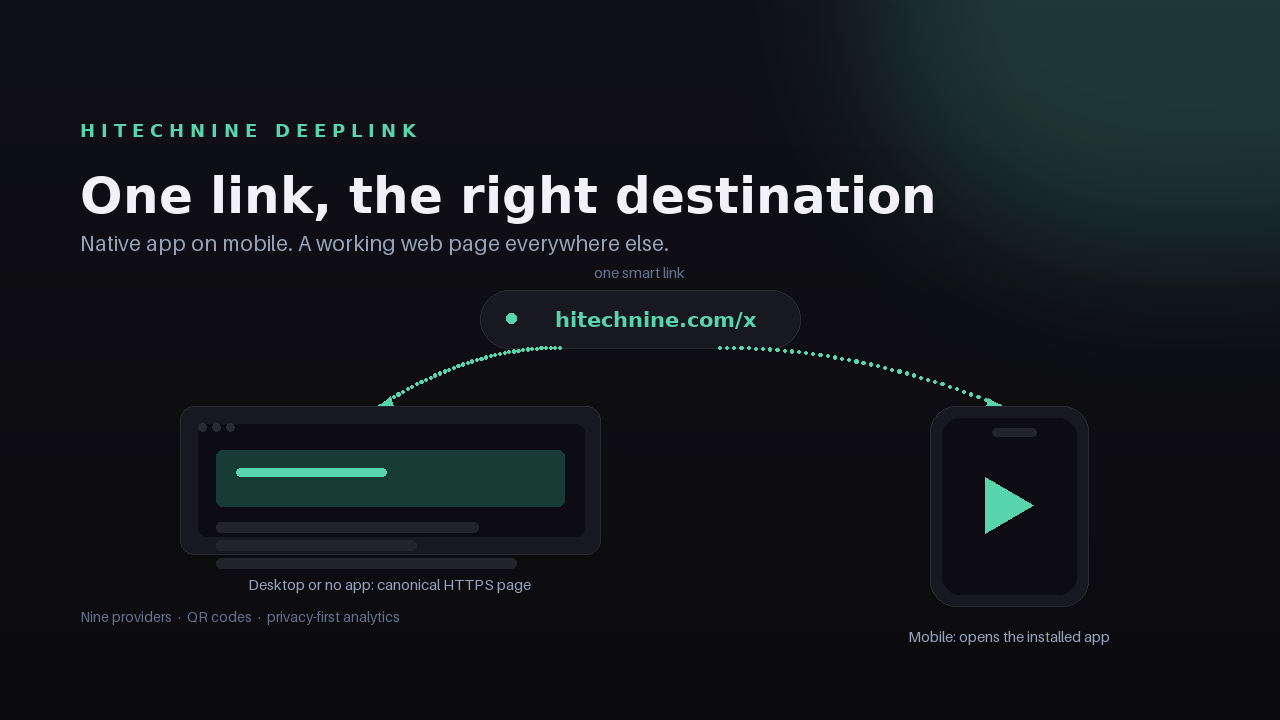
A deep link removes that step. The mechanism is less mysterious than it sounds: for each visitor, pick the destination that matches their device and the provider, and keep a working web page underneath for everything else.
Hitechnine DeepLink is built around that single decision. One URL resolves per device: a native app on iPhone and Android, and a web fallback that never dead-ends on desktop.
Key Takeaways
- One link resolves per device: native app on iPhone and Android, web fallback everywhere else.
- Routing uses Android intents, iOS schemes and universal links, chosen per provider and per platform.
- Nine providers are supported: Spotify, YouTube, Apple Music, Amazon across 23 storefronts, Instagram, TikTok, Facebook, WhatsApp and Telegram.
- Analytics count unique visitors with salted hashes and store location as a country code only, so raw IP addresses are never kept.
Why a browser tab is the wrong destination
A browser tab is a reasonable default for a document and a poor one for an app. When someone taps a music link on a phone, the app is usually already installed, so the browser adds a redirect, a cookie notice and an app-opening prompt that the visitor has to act on.
Each of those is a place to leave. The visitor who wanted to listen is now doing logistics.
The same link behaves differently again on desktop, where there is no app to open at all. A link built for mobile often ends up at a page that assumes a store listing.
What a deep link actually does
A deep link is a URL that resolves according to what it is opened on. On a phone it can hand the tap to an installed app. On a laptop it serves a web page that works. The person clicking does not choose a destination, and does not need to know which destinations exist.
DeepLink does this with the platform's own routing primitives: Android intents, iOS schemes and universal links, selected per provider and per platform. Every route keeps a canonical HTTPS fallback, so if the app cannot open, the visitor still lands on the standard web destination rather than an error.
The design goal is unglamorous: no dead ends. A route that fails should degrade into something ordinary, not into a screen that says the link is broken.
Nine providers, one link
A release rarely lives in one place. DeepLink covers Spotify, YouTube, Apple Music, Amazon across 23 storefronts, Instagram, TikTok, Facebook, WhatsApp and Telegram, with more providers being added over time.
That range matters most for the links whose context you do not control: a link in a bio, a QR code on a sleeve, a message forwarded between friends. In those places you cannot ask the visitor what device they are on, and a list of nine buttons is a decision handed to someone who only wanted to press play.
The in-app browser problem
Most taps on a shared link do not happen in a browser. They happen inside Instagram, TikTok or a messaging app, in an in-app browser with its own rules.
DeepLink attempts to open the app automatically wherever the platform allows it. Where it does not, it shows a tap-to-open page that names the provider, which is the honest option: iOS requires a user tap inside third-party browsers by platform policy, and no amount of clever routing changes that.
This is worth stating plainly, because it is where most "app link" claims fall apart. The right answer is a page that continues the journey, not a spinner.
Analytics without storing IP addresses
Link analytics usually mean tracking. DeepLink counts clicks and unique visitors and reports trends, devices, in-app browsers, referrers and a live visitor map, while counting unique visitors with salted hashes and storing location only as a country code. Raw IP addresses are not kept.
That is a smaller claim than "we track everything", and a more defensible one. You still get the numbers you make decisions with: which surface sent the click, whether the visitor arrived in an app or a browser, and whether a campaign is moving.
QR codes, aliases and collections
The rules of a short link are still the rules it had before. A QR code that points at a smart URL is repointable; one that points at a destination is not. DeepLink therefore generates QR codes in SVG and PNG against the smart URL rather than the final destination.
Aliases keep a URL readable enough to say out loud. Custom domains put your own name on it from Pro upwards. Collections group links into campaigns so you read aggregate performance instead of chasing individual rows, and for Amazon partners an affiliate tag can be injected automatically across all 23 storefronts.
Choosing a plan
Free covers a small operation: 500 clicks per month, 10 smart links, all nine providers, QR codes and 30 days of analytics.
Pro, at $9 per month or $90 per year, raises that to 25,000 clicks, unlimited links, 3 custom domains, API access and 12 months of analytics.
Business, at $29 per month or $290 per year, covers 150,000 clicks, 10 domains, an API with higher limits and 24 months of analytics.
Plan limits pause new links at the start of a period. Existing links keep working, so nothing you have already shared breaks.
Getting started
Sign in at https://hitechnine.com/login, create a link, and put it everywhere you currently put a list of buttons. Test it yourself on a phone and on a desktop before you share it, then compare referrers a week later.
The goal is not a cleverer link. It is a shorter distance between someone deciding to listen and someone listening.